TL;DR
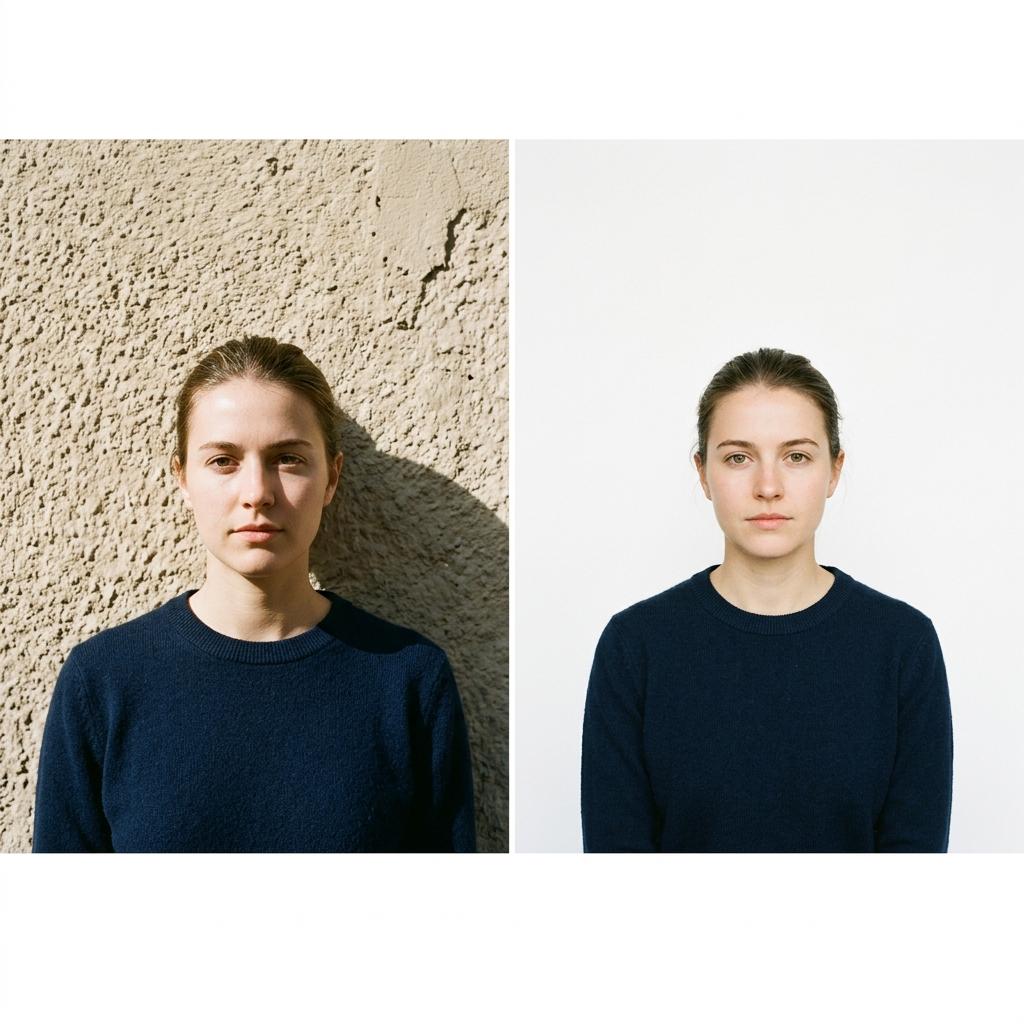
The safest background is a plain, uniform white wall or backdrop with no texture, patterns or shadows. The US, China and India require white or off-white. The UK accepts light grey or cream. A few countries allow light blue. Shadows on the background are a leading cause of rejection — always stand at least 1.5 m away from the wall to avoid casting your own shadow.
Background colour requirements by region
The most common requirement worldwide is a plain white or off-white background. This is the standard for the US, Canada, China, India, Japan, and most of Asia and the Americas. The UK and Ireland accept light grey or plain cream. A handful of countries in the Middle East and Southeast Asia accept light blue backgrounds. When in doubt, white is always the safest choice — no country rejects a photo for being 'too white'.
How to avoid background shadows
Background shadows are one of the top three rejection reasons. They happen when you stand too close to the wall, and the lighting casts your silhouette behind you. The solution: stand at least 1.5 to 2 metres in front of the background, and ensure the light source is in front of you (not above or behind). If you see a shadow, move further from the wall or adjust the light angle. Soft, diffused natural light from a window creates the fewest shadows.
DIY backgrounds at home
If your walls aren't suitable (coloured, textured, or marked), you have several options. A large white poster board (foam core) from a craft shop is ideal — it's rigid, wrinkle-free and inexpensive. A white bedsheet works but must be stretched flat and well-lit to avoid wrinkle-shadows. White fabric from a fabric store can be clipped to a curtain rod. Avoid glossy materials that create hotspots from reflected light.
Can IDPIC remove or change my background?
Yes. IDPIC's AI can detect and remove the original background and replace it with a compliant solid colour for your selected document type. This works best when there is clear contrast between you and the background. However, starting with a plain, light-coloured background gives the most reliable results and a more natural-looking final photo.
Key data at a glance
| Country | Accepted background | Notes |
|---|---|---|
| United States | White or off-white | Must be free of shadows and patterns |
| United Kingdom | Light grey or cream | Avoid pure white for printed photos |
| Canada | White or light colour | Even illumination required |
| China | Uniform white | Very strict — no visible texture |
| Australia | Plain white | No shadows, no other objects |
| India | White | For OCI/PIO: light-coloured accepted |
| Germany | Uniform light grey | No pure white for biometric photos |
| Japan | White or very light | No patterns or graduations |
| Schengen visa | Light colour (white/grey) | Country-specific sub-rules apply |
| Thailand | White | Strict white for official documents |
Frequently asked questions
Can I use a light blue background?
Only if the specific country and document type accept it. A small number of countries (e.g. some Middle Eastern states) allow light blue. For US, UK, Canada, China and most applications, blue will be rejected. When in doubt, use white.
My wall is off-white / cream. Will it work?
For US applications, off-white is explicitly accepted. For countries requiring 'uniform white' like China, it may be too warm. Test by uploading to IDPIC — the compliance checker will flag if the background colour is outside the acceptable range.
How do I remove shadows from the background?
Move further from the wall (1.5–2 m gap), position the light source in front of you, and avoid overhead-only lighting. If shadows persist, use two soft light sources at 45-degree angles. As a last resort, IDPIC's background removal can digitally replace the background.
Real-world scenario
International student: Photo rejected for shadow on background
Wei is applying for a UK student visa. He takes a photo standing against his apartment's white wall, but the overhead kitchen light casts a dark shadow behind his shoulders. The visa portal rejects it with 'non-uniform background'. He moves to the living room, stands 2 metres from the wall, faces the large window for front-facing natural light, and re-shoots. The shadow is gone. He uploads to IDPIC, selects 'UK Visa Photo', and the compliance check passes. The entire fix took 10 minutes.